What Happens If I Leave a DTG Printer Unattended for 1-2 Weeks? | GNFEI
What Happens If I Leave a DTG Printer Unattended for 1-2 Weeks?
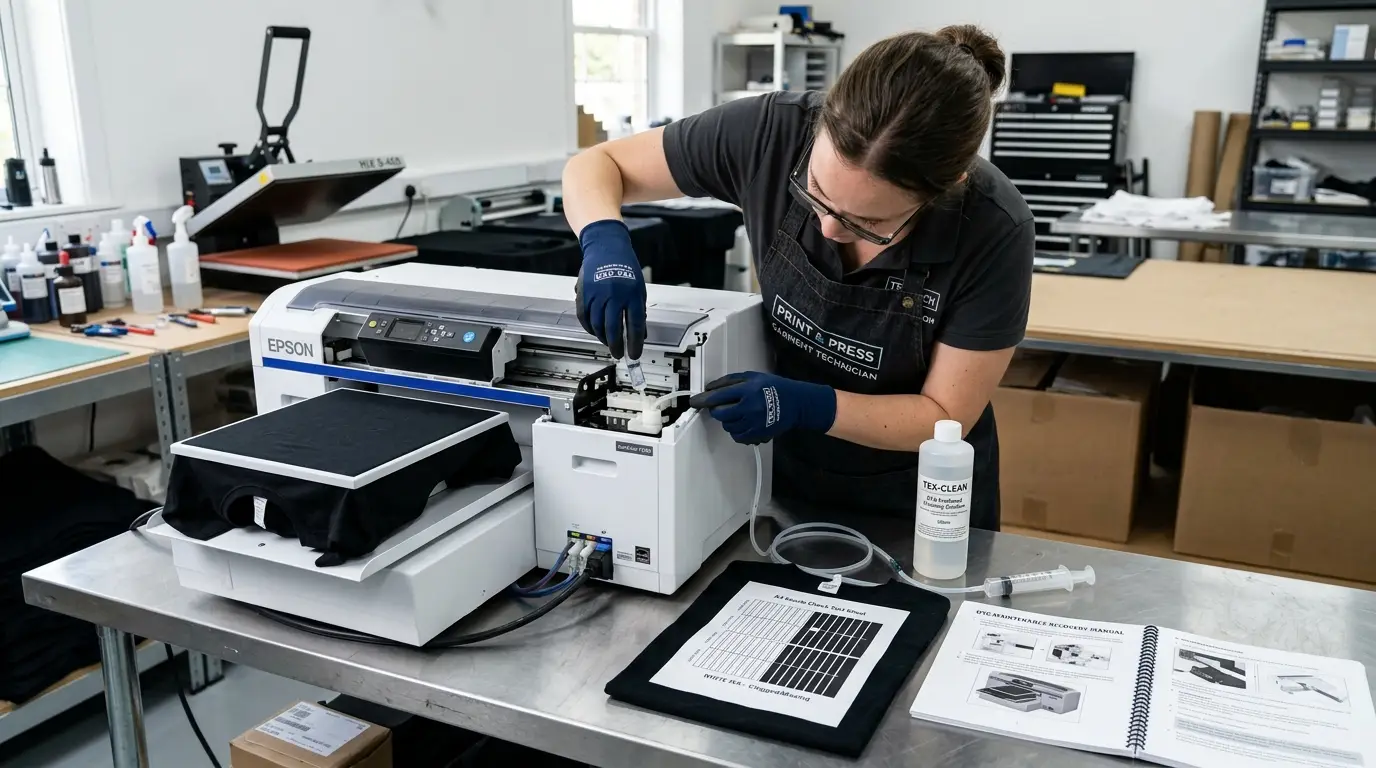
Every custom apparel business owner eventually faces the holiday dilemma: you are closing the shop for a one-week national holiday, taking a ten-day family vacation, or experiencing an unexpected lull in customer orders. Your commercial Direct-to-Garment (DTG) printer sits quietly in the dark print room. But behind that calm exterior, an aggressive chemical and physical chain reaction is silently taking place inside your printhead, ink lines, and capping station.
Unlike sublimation, eco-solvent, or conventional paper printing machines that can sit dormant for weeks with minimal consequences, water-based DTG printing relies on delicate fluid dynamics. When high-solids textile inks—especially white titanium dioxide ink—remain static without daily agitation, mechanical wiping, or humectant replenishment, liquid suspensions rapidly degrade into solid blockages. Understanding the exact mechanical timeline of unattended printer damage is essential for protecting your equipment and avoiding an unexpected $1,500+ printhead replacement bill upon your return.
The Emergency Warning: What NOT to Do Upon Returning
If your DTG printer has been left idle for 7 to 14 days without preparation, DO NOT immediately power on the printer and run consecutive deep head cleanings! Running aggressive suction against dried nozzles creates internal negative pressure cavitation that pulls congealed pigment sludge into internal nozzle micro-filters, rupturing the delicate micro-piezo membranes and guaranteeing instant, permanent printhead death.
1. The 14-Day Timeline: How Neglect Destroys a DTG Printhead
When a DTG printer sits idle, damage does not occur all at once; it unfolds across four distinct chemical and physical stages. The infographic below illustrates the progressive deterioration that takes place inside the printhead assembly over a two-week unattended period:
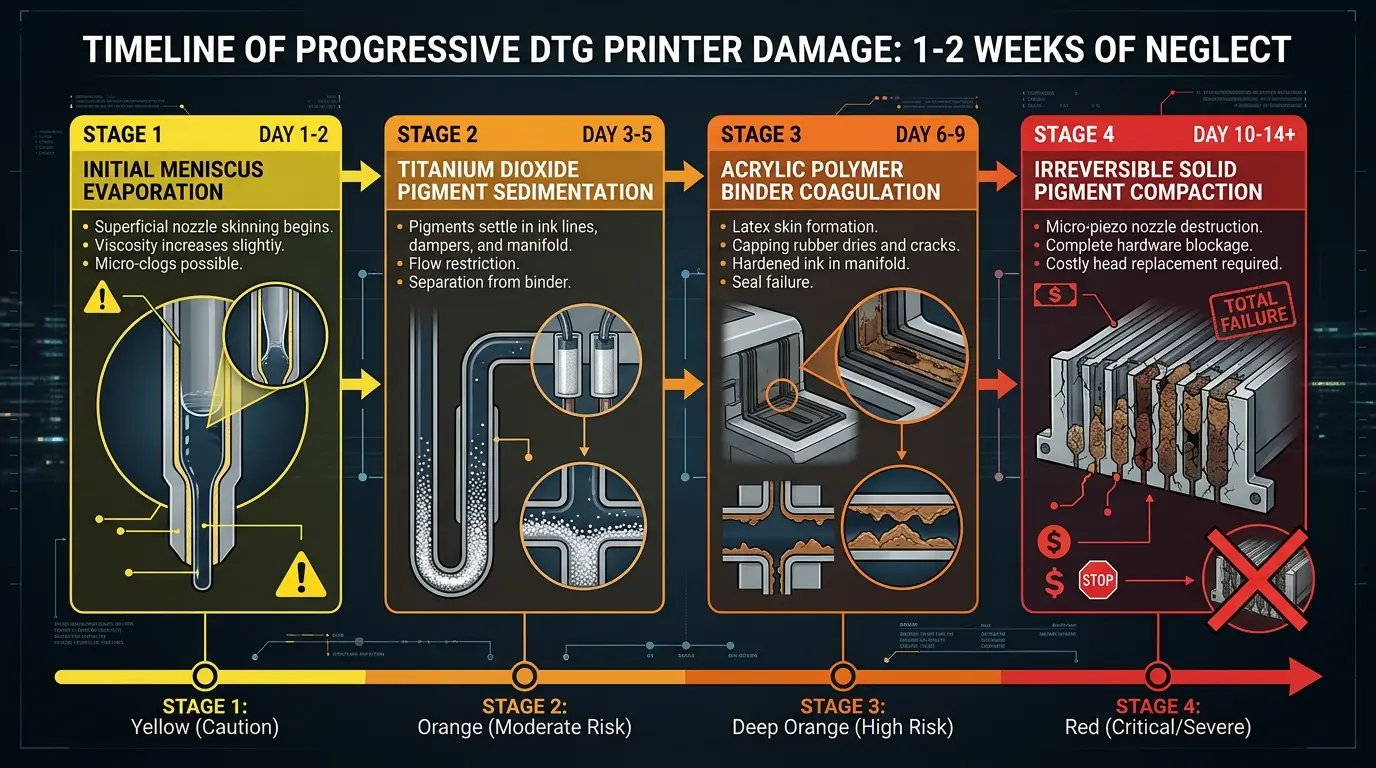
Figure 1: Progressive degradation stages of water-based textile ink inside an unattended DTG printhead
Stage 1: Days 1 to 2 – Superficial Meniscus Evaporation
Even with the printhead docked against the rubber capping station, the micro-environment inside the cap is not 100% hermetic if dried ink crust exists on the seal. Within 24 to 48 hours, volatile co-solvents and water molecules evaporate from the exposed liquid surface (the ink meniscus) at each 25-micron nozzle orifice. A thin, viscous skin forms at the nozzle exit, increasing localized ink viscosity from 4 cP to over 50 cP. At this stage, a standard single light cleaning cycle or manual wet cap soak can easily dissolve the skin.
Stage 2: Days 3 to 5 – Gravitational Titanium Dioxide Sedimentation
Without mechanical circulation or agitation, gravitational settling takes over. Titanium dioxide (TiO2) mineral particles have a density four times greater than water (~4.2 g/cm³ vs 1.0 g/cm³). By Day 4, the pigment particles drop out of colloidal suspension and settle along the lower interior walls of the supply tubes, damper filter meshes, and printhead manifold branches. The ink separates into a clear, watery supernatant liquid on top and a dense, chalky white sediment layer on the bottom.
Stage 3: Days 6 to 9 – Latex Binder Coagulation & Capping Seal Failure
DTG textile inks contain specialized acrylic or polyurethane emulsion binders designed to polymerize and cross-link under heat. As moisture loss continues past Day 6, the concentration of polymer resin reaches a critical coagulation threshold. The liquid ink transforms into an elastic, rubber-like latex gel. Simultaneously, ink residue on the capping station rubber seal completely dries and shrinks, breaking the vacuum seal and exposing the entire nozzle plate to open shop air.
Stage 4: Days 10 to 14+ – Irreversible Pigment Compaction (Terminal Blockage)
By the end of the second week, the settled titanium dioxide particles lose their steric stabilization shells entirely and form an interlocking, crystalline solid plug. This compacted mineral brick fills the micro-fluidic chambers behind the nozzles and clogs the internal stainless steel filter screens. At this stage, standard software cleanings, solvent flushes, and manual syringe suction cannot dislodge the hardened cement. The printhead has suffered terminal failure.
2. Why the Capping Station Fails to Protect Dormant Printheads
Many operators assume that as long as the printhead is "docked" in its home position, it is protected indefinitely. In reality, standard capping stations are designed for short overnight rest periods, not multi-week preservation. The diagram below illustrates how atmospheric exposure occurs when a capping station is left unmaintained:
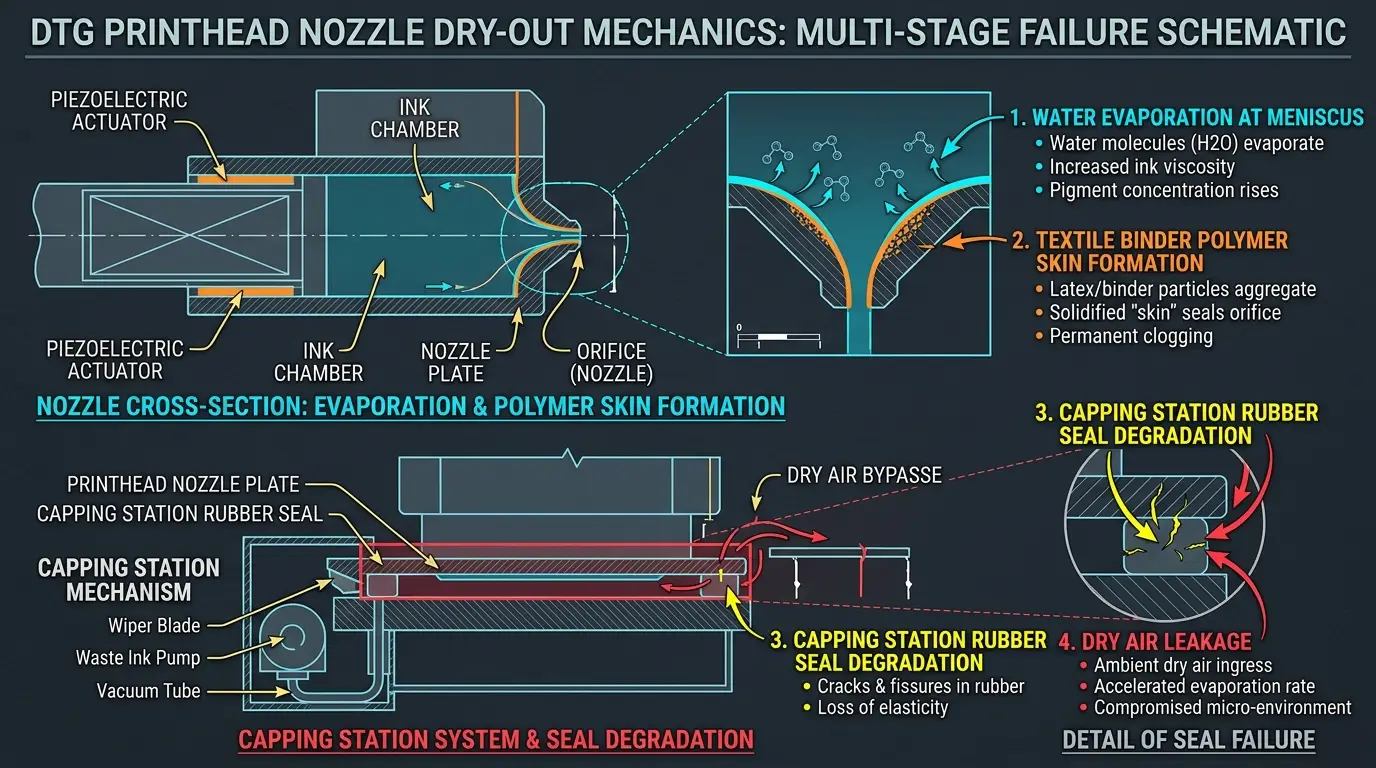
Figure 2: Microscopic failure mechanism of capping station seals during extended unmonitored storage
During active production, the porous suction sponge inside the capping station tray is soaked with fresh waste ink. When the printer is abandoned:
- Evaporative Sponge Crusting: The waste ink within the capping sponge dries out completely within 3 to 4 days, transforming the absorbent pad into a hard, desiccated brick that actively wicks moisture away from the printhead above it.
- Rubber Gasket Warping: Without daily cleaning fluid lubrication, residual textile binders dry along the top rim of the rubber sealing lip. As the residue dries, it shrinks, creating microscopic air channels that allow dry ambient air to circulate directly across the nozzle face.
- Waste Tube Back-Pressure: If the waste ink tube leading to the external bottle is left un-clamped, capillary evaporation draws air up through the peristaltic pump tubing, drying out the underside of the capping mechanism.
3. The 25-Minute Vacation Storage SOP: How to Safely Leave Your DTG Printer
If you know in advance that your shop will be closed for more than 4 to 5 consecutive days, you must execute a Proactive Long-Term Storage Flush. This straightforward 25-minute protocol replaces volatile textile inks with non-drying, humectant-rich preservation fluids:
| Step | Action Required | Chemical / Supply | Critical Technical Instructions |
|---|---|---|---|
| Step 1 | Drain White Bulk Tanks | Syringe & Original Ink Bottles | Extract all white ink from supply bottles and return to original sealed containers. Store in a dark, climate-controlled cabinet. |
| Step 2 | Flush Ink Lines with Cleaner | DTG Cleaning Flush Fluid | Fill tanks with 100 mL of cleaning fluid. Perform an ink charge cycle until fluid in the lines runs completely clear of white pigment. |
| Step 3 | Charge Long-Term Storage Fluid | Glycol-Based Storage Solution | Load specialized shipping/storage fluid (often colored blue or clear). Charge through lines until it fills dampers and the printhead manifold. |
| Step 4 | Deep Clean Capping & Wiper | Foam Swabs + Cleaning Fluid | Scrub the rubber capping station perimeter gasket and clean both sides of the wiper blade until 100% free of dried ink crust. |
| Step 5 | Flood Capping Sponge & Clamp | Capping Moisturizer + Line Clamp | Dispense 2 to 3 mL of capping moisturizer onto the sponge. Dock the carriage securely. Clamp the waste tube to stop backward evaporation. |
4. Post-Absence Emergency Salvage Protocol: If You Forgot to Prep
What happens if an emergency forced you to leave the shop unexpectedly, and you return to find your DTG printer sitting dry for 10 days? Do not panic, and do not press the 'Power Clean' button. Follow this phased recovery protocol to salvage the printhead without causing internal delamination:
Phase 1: The Passive Warm Solvent Cap Soak (4 to 6 Hours)
Manually release the carriage lock. Fill the capping station sponge to its brim with warm (approx. 40°C / 104°F) OEM DTG printhead recovery fluid. Slowly slide the carriage back over the capping station and ensure the rubber rim seals firmly. Allow the printhead nozzle plate to sit submerged in the warm solvent bath for at least 4 to 6 hours (or overnight). The solvent will slowly soften and liquefy dried acrylic meniscus crusts without mechanical stress.
Phase 2: Bottom-Draw Negative Pressure Syringe Extraction
Disconnect the waste ink tube leading from the bottom of the capping station pump. Attach a 50 mL medical syringe with silicone tubing directly to the capping station suction tube. While the carriage is firmly docked, gently draw the syringe plunger backward. This creates an even, gentle vacuum across all channels, pulling softened ink plugs down into the cap without pushing debris deeper into the manifold.
Phase 3: Damper Inspection & Replacement
Remove the printhead cover and inspect the white ink dampers. During a 14-day absence, titanium dioxide frequently packs solid inside the internal mesh screen of the damper. If the damper feels dense or shows caked white residue, do not attempt to wash it—replace all white ink dampers with fresh units ($5 to $10 each) before priming fresh ink.
5. Hardware That Mitigates Idle Risks: The GNFEI F85G3 A3 Solution
For small business operators who cannot guarantee 365-day physical shop presence, hardware design plays a decisive role in survivability. The GNFEI F85G3 A3 DTG Printer is engineered specifically with automated standby defenses that protect ink fluidics:
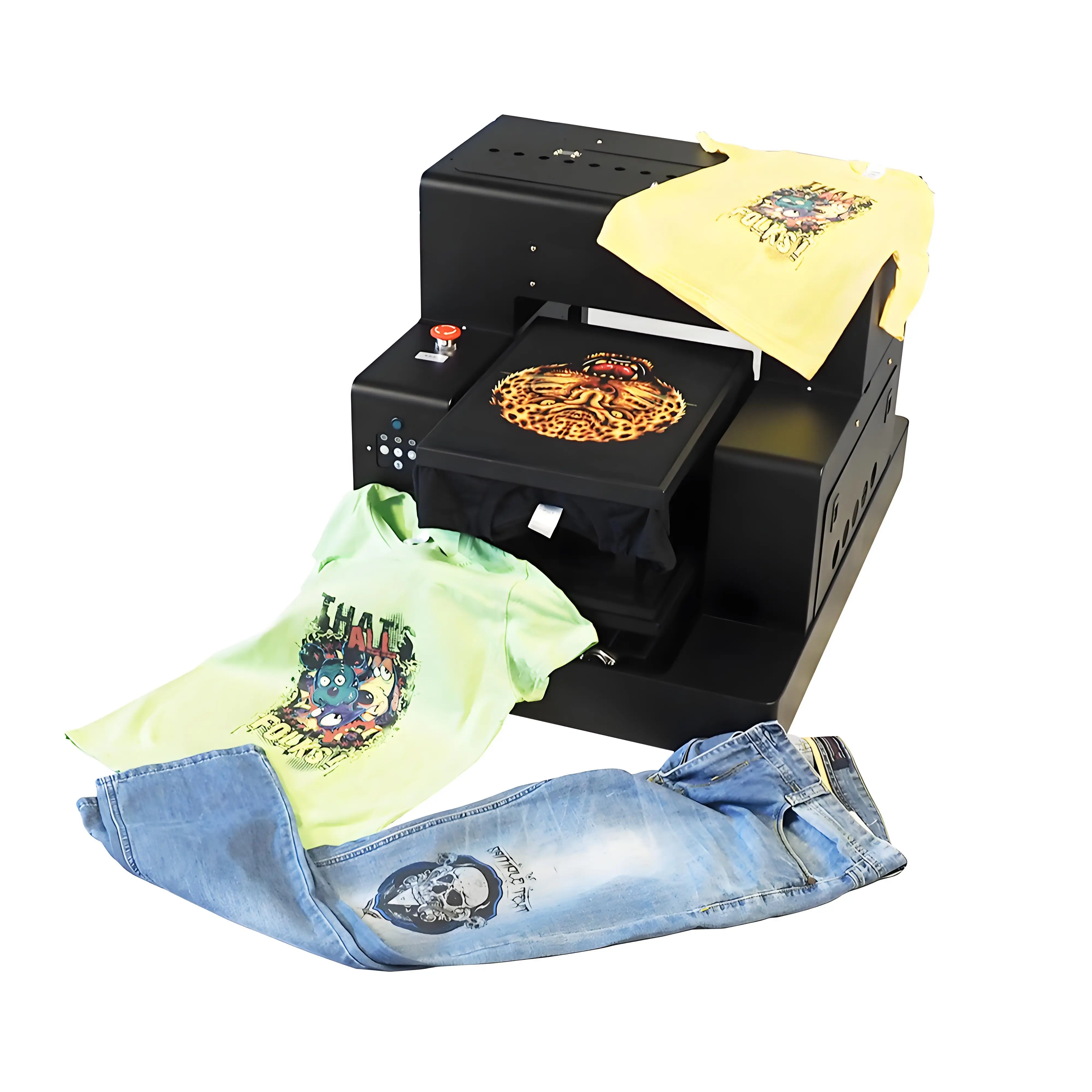
GNFEI F85G3 A3 Flatbed DTG T-Shirt Printing Machine
Features an autonomous timed White Ink Management System (WIMS) that keeps titanium dioxide pigments circulating even during extended production standbys, dual high-precision MicroPiezo printheads, intelligent infrared platen height detection, and a high-vacuum peristaltic capping station that maintains a lasting airtight seal.
Frequently Asked Questions: Leaving DTG Printers Idle & Vacation Care
Technical answers to the top 10 frequently searched questions regarding vacation shutdowns, long-term idling, and emergency printhead salvage:
Q1. Can a DTG printer survive being left unattended for 1 to 2 weeks?
If left completely unprepared with standard textile inks loaded and no automated circulation active, the printer has an extremely low survival rate—usually suffering terminal printhead clogging on white channels. However, if properly flushed and filled with specialized long-term storage solution, a DTG printer can safely sit idle for up to 3 to 4 weeks without any damage.
Q2. Which ink dries out first during an unattended shutdown: CMYK or White?
White ink dries out and fails significantly faster than CMYK colors. While CMYK dye or soluble pigment inks remain liquid for longer, white DTG ink contains dense titanium dioxide mineral pigments and acrylic binders. Within 3 to 5 days of stillness, the pigment settles out of suspension, compacting into a dense, clay-like sludge that permanently chokes the micro-piezo channels.
Q3. What should I do first when returning to an unattended DTG printer?
Never turn on the machine and immediately execute multiple aggressive power cleanings. Doing so creates heavy suction that pulls congealed pigment sludge and dry meniscus skins deep into internal micro-piezo nozzle filters. Instead, manually disengage the carriage, inspect the capping station, deposit warm DTG cleaning solution on the cap, and let the nozzles soak for 3 to 4 hours.
Q4. Why is running consecutive deep cleans after an absence dangerous?
Running multiple consecutive deep cleanings causes severe negative pressure cavitation. If dried ink plugs the nozzle plate, the powerful pump pulls air around damper gaskets and rubber o-rings. This introduces air locks into the printhead channels and can cause delamination of the microscopic internal piezo crystal membrane, destroying the head permanently.
Q5. How do I prepare a DTG printer for a planned 2-week vacation?
The proper vacation preparation protocol requires draining the white ink lines, flushing them thoroughly with DTG cleaning fluid, and filling the entire ink delivery system with specialized humectant-rich shipping/storage solution. Finally, clean the capping station rubber seal thoroughly, saturate the capping sponge with capping moisturizer, and verify the carriage is firmly parked.
Q6. Can I leave distilled water in the printhead during vacation?
No. Never store a printhead with pure distilled water for longer than 24 hours. Distilled water lacks biocide and humectant preservatives, allowing rapid bacterial and fungal growth inside the ink lines. Furthermore, pure water evaporates rapidly, leaving behind mineral-starved dry nozzles. Always use specialized DTG storage solution containing glycol humectants and biocides.
Q7. Does leaving the printer powered on 24/7 prevent clogs during vacation?
Leaving modern commercial printers with automated WIMS circulation and timed auto-spitting powered on can help keep white ink moving in supply lines. However, if the waste ink bottle fills up, or if room humidity drops below 40% while you are away, the capping station seal can dry out, leaving the nozzles vulnerable. True storage fluid flushing remains the only 100% foolproof method for multi-week absences.
Q8. What is the cost difference between proper vacation prep vs printhead replacement?
A complete bottle of DTG flush and storage solution costs approximately $25 to $40 and takes 25 minutes of labor to apply. By contrast, replacing an Epson MicroPiezo industrial printhead destroyed by solidified titanium dioxide costs between $900 and $1,800, plus lost production time and emergency technician service fees.
Q9. How can I tell if my printhead is permanently dead or still salvageable?
A printhead is usually salvageable if cleaning fluid can still pass through the nozzle plate in a smooth 'curtain' waterfall pattern when gentle suction is applied via syringe. If applying gentle positive pressure meets absolute resistance and fluid squirts sideways or leaks internally from the manifold glue lines, the internal channels have suffered delamination or terminal blockage.
Q10. Will an ultrasonic cleaning bath recover a printhead left idle for two weeks?
An ultrasonic bath should only be used as an extreme last resort. Submerging only the bottom 1-2 mm of the nozzle plate in warm cleaning solution with low-frequency ultrasonic pulses (under 40 kHz) for 2 to 3 minutes can break loose compacted titanium dioxide crust. However, excessive ultrasonic exposure shatters internal piezo crystals and strips the plate's hydrophobic coating.